You run one paid ad campaign. Your audience spans the US, Canada, the UK, and Australia. But your landing page only exists in one version, with one currency, one phone number, and one offer. Every visitor who lands on the wrong page costs you money. Geo targeting links solve this problem at the link level, before the visitor ever sees your page.
This guide walks you through the One Link, Many Destinations framework, covers device targeting alongside geo, and shows you how to set everything up using HitURL's dashboard and API.
What Are Geo Targeting Links?
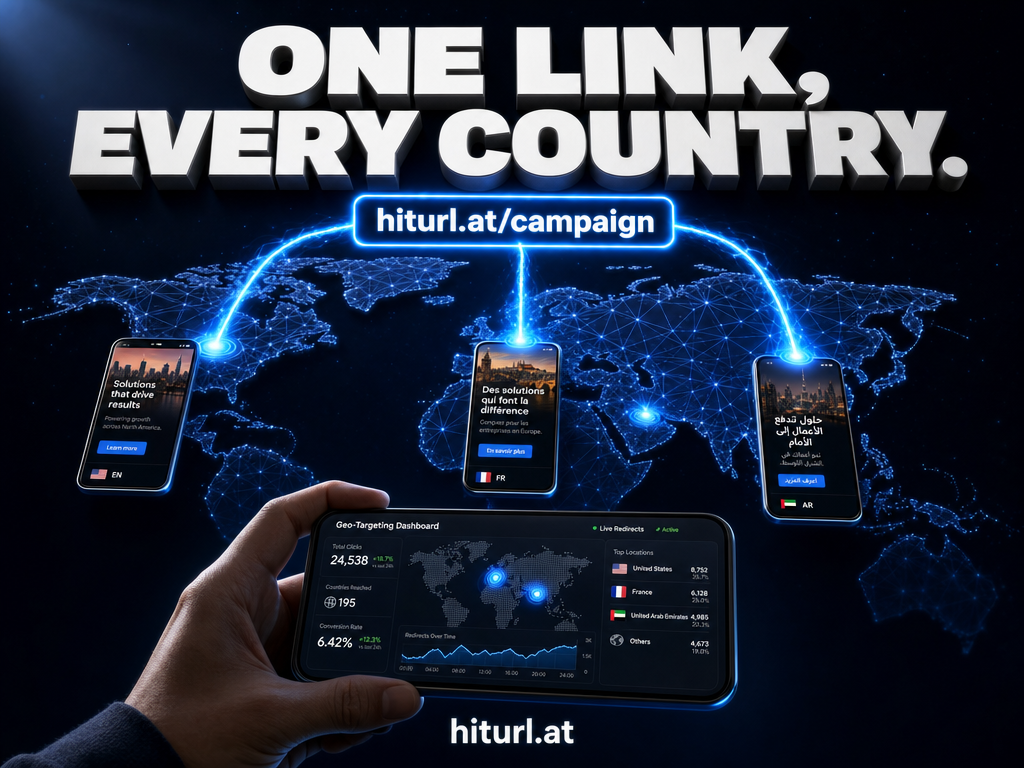
A geo targeting link is a single short URL that detects a visitor's location using their IP address and redirects them to a different destination based on their country. The visitor clicks one link. The system reads their location. They land on the page built for them.
A geo targeting link replaces a dozen regional URLs with one shareable link. The routing logic lives in the link itself, so your ads, emails, and bio pages stay clean while visitors always reach the right destination.
This is different from creating separate links for each region and manually targeting them in your ad platform. With a geo-targeted short link, the routing logic lives in the link itself. One URL works everywhere, and the right audience always lands in the right place.
IP geolocation, the technology that powers this, maps a visitor's IP address to a geographic location. It is accurate at the country level for roughly 95% or more of internet traffic according to Google's guidance on managing multi-regional sites. City-level accuracy is lower, but country-level redirects are highly reliable for most marketing use cases.
The One Link, Many Destinations Framework
This is the core mental model you need. One short link acts as a smart router. You define rules. The link follows them.
Here is how a typical international campaign looks using this framework:
- US visitors →
yoursite.com/us - CA visitors →
yoursite.com/ca - UK visitors →
yoursite.com/uk - All others →
yoursite.com/global(your default fallback)
The default destination matters. You always need a fallback for countries you have not explicitly mapped. Sending unmatched traffic to a 404 or a mismatched regional page kills conversions from markets you did not anticipate.
The default destination in a geo-targeted link is not an afterthought. It is your catch-all for every country you did not plan for. Set it to your best-performing general landing page, not your homepage.
You can apply this framework to as many countries as your campaigns require. Start with your top three or four markets. Add more rules as your data shows where traffic is coming from.
Device Targeting: The Other Half of the Equation
Geo targeting handles location. Device targeting handles behavior. Together they give you a complete picture of how to route any visitor.
A visitor in the UK on a mobile device might need a different experience than a UK visitor on desktop. Your mobile page might be a faster-loading AMP version. Your desktop page might include a full product comparison table that does not render well on small screens.
Device targeting rules work exactly like geo rules. You define destinations for mobile, tablet, and desktop separately. You can combine them. A link can route US mobile users to one page, US desktop users to another, and everyone else to your default.
This matters most for app download campaigns. You can send iOS users to the App Store, Android users to Google Play, and desktop visitors to your web landing page, all from a single link you put in your bio, your email footer, or your ad.
Real Use Cases for Location Based Redirects
International Paid Ads
Running one ad set across multiple countries is a common budget-saving approach. Instead of duplicating your ad creative for each region, you use a single geo targeting link as the destination URL. Each visitor lands on the right regional page. Your ad account stays organized. Your reporting stays clean.
Pair this with UTM parameters on your short links so your analytics platform captures both the campaign source and the destination country in the same session data.
Affiliate Localization
Affiliate marketers lose commissions every day because their links send international visitors to an offer that is geo-restricted or unavailable in that country. A location based redirect fixes this. You map each country to its local affiliate URL. Visitors from the US get the US affiliate link. Visitors from Germany get the EU alternative. No lost commissions. Using a URL shortener for affiliate marketing is already a best practice for link hygiene; geo targeting takes it further.
Multi-Region Product Launches
Launching in multiple markets on the same day? One announcement link in your press release or newsletter handles every market. Each journalist, reader, or partner lands on the localized launch page for their country. You write one email. One social post. One link.
For teams managing campaigns across regions, a structured link management workflow keeps everyone aligned on which destination URLs are active and which are being tested.
For multi-region launches, a single geo-targeted link in your press release means every journalist and partner automatically lands on the page built for their market. You write the announcement once. The link does the routing.
How to Set Up Geo Targeting Links in HitURL
HitURL's dashboard makes geo targeting setup straightforward. Here is the step-by-step process.
- Create a new short link. Go to HitURL's link shortener and paste your default destination URL. This is the fallback for visitors whose country you have not mapped.
- Set a custom alias. Use a memorable slug, especially if this link will appear in print, video, or a bio page. A branded short link with a custom domain adds credibility to every touchpoint.
- Open the targeting rules panel. In the link settings, find the Geo Targeting section. You will see a country selector and a destination URL field for each rule.
- Add your country rules. Select US, set the destination to your US landing page URL. Repeat for CA, UK, and any other markets. Add as many rules as your campaign requires.
- Add device rules if needed. In the Device Targeting section, set separate destinations for mobile and desktop if your pages differ by device type.
- Save and test. Use a VPN set to each target country to verify that visitors land on the correct destination. Check that your default fallback works for a country you have not mapped.
See how HitURL tracks every click, fires your pixels, and generates QR codes — free at hiturl.at.
Setting Up Geo Targeting Links via the HitURL API
If you manage links programmatically, create geo-targeted links through the REST API. This is the right approach when you are building a campaign management tool, setting up links at scale, or integrating with a CMS or e-commerce platform.
The API accepts geo rules as an array of country-code and destination-URL pairs in the same request body you use to create any short link. You can also update rules on existing links without changing the short URL itself, which is useful when your regional landing pages change after launch.
The HitURL developer documentation covers the full geo targeting payload structure, including how to set the default destination and how to pass device targeting rules in the same request. For practical code examples in multiple languages, see the URL shortener API code examples guide.
With the HitURL API, you can create a geo-targeted link with country rules, a default fallback, and device targeting all in a single POST request. No manual dashboard work required when you are building at scale.
Does Geo Targeting Affect SEO?
This is the question most marketers ask before committing to location based redirects. The short answer: no, when done correctly.
Short links with geo targeting use server-side redirects. Search engine crawlers originate from specific IP addresses, usually mapped to the United States. They will follow the US rule or the default rule when they crawl your link. They do not see multiple competing pages from a single URL. The redirect chain is transparent.
For your actual landing pages, follow standard hreflang best practices on the destination pages themselves. The geo-targeted link routes the visitor. Hreflang helps search engines understand the relationship between your regional pages. These two approaches work alongside each other, not against each other.
What to Track After You Launch
Geo targeting links generate richer click data than standard short links. Every click carries a country tag. You can see exactly which markets are driving volume and which rules are triggering most often.
Use this data to refine your campaign. If you see significant traffic from a country you have not mapped, add a rule for it. If a regional landing page has a low conversion rate compared to others, test a new destination for that country rule without touching the short link itself.
Connect retargeting pixels to your geo-targeted link so that every visitor, regardless of their destination, fires your Facebook, Google, or LinkedIn pixel on click. You build segmented retargeting audiences by country without any extra tagging work on your landing pages.
Frequently Asked Questions
Does geo targeting on a link hurt SEO?
No. The geo-targeted short link redirects human visitors to regional pages. Search engine crawlers follow the default destination. Your SEO is not affected by the routing logic in the link itself. Apply hreflang tags on your destination pages to handle international SEO properly.
How accurate is IP geolocation for country-level redirects?
Country-level IP geolocation is accurate for the vast majority of internet traffic, typically above 95%. Accuracy drops at the city and region level. For country-level campaign routing, IP geolocation is reliable enough for production use in paid ads and affiliate localization.
Can I combine geo targeting and device targeting in one link?
Yes. You can set rules that combine country and device type. For example, UK mobile visitors go to one destination, UK desktop visitors go to another, and all other visitors hit your default. Both rule sets live in the same link configuration.
What happens when no geo rule matches a visitor's country?
The visitor is sent to your default destination URL. This is the fallback you set when creating the link. Always set a relevant default. Sending unmatched traffic to a broken or mismatched page wastes the click.
Can I update geo targeting rules without changing the short link?
Yes. You can edit the destination URLs for any country rule at any time through the HitURL dashboard or API. The short link URL stays the same. This is especially useful when regional landing pages change after a campaign goes live.
Start creating geo targeting links that route every visitor to the right destination. Create your free account at hiturl.at. No credit card needed.