

The Link You Share Is Also a Tracking Decision
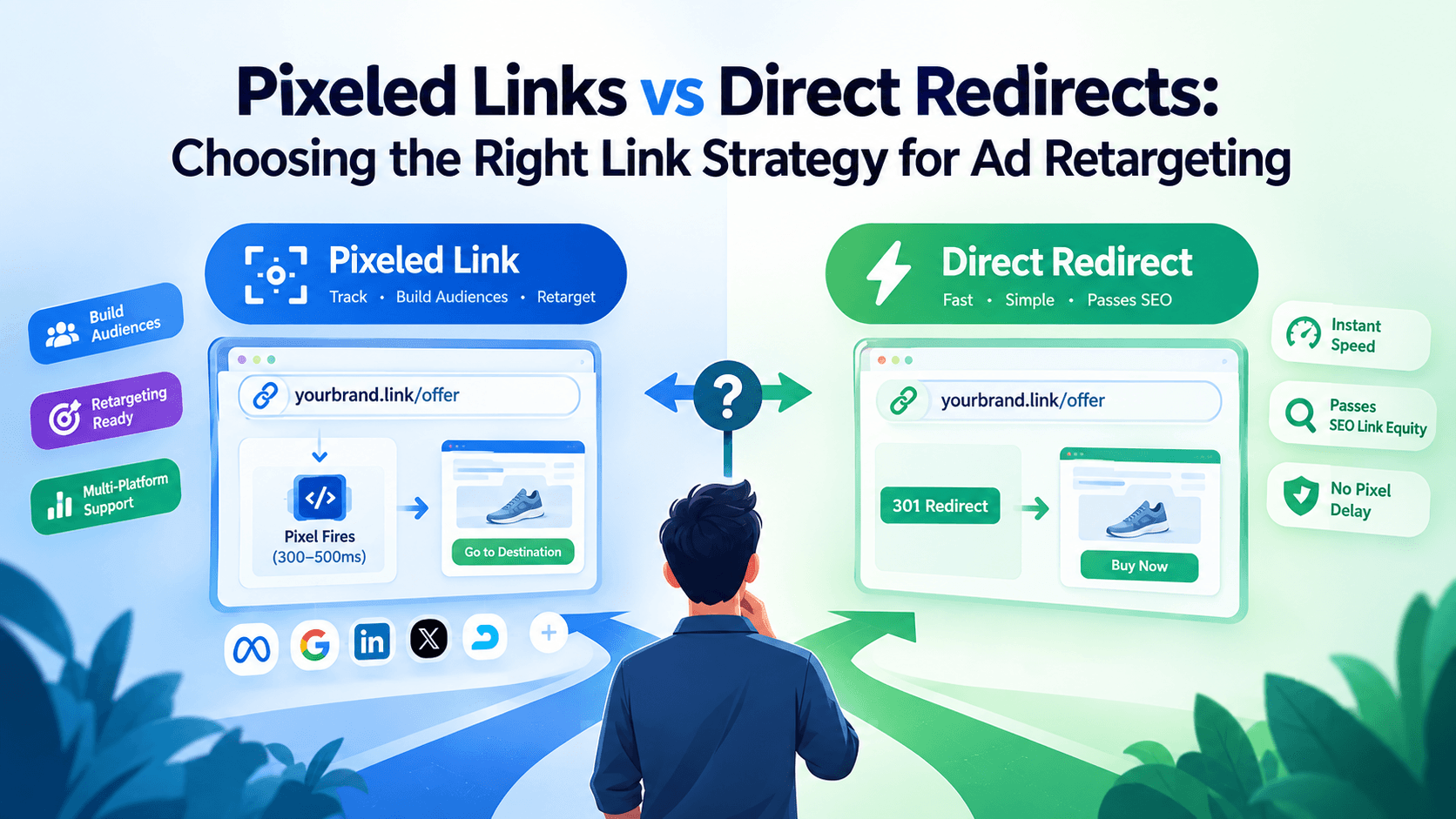
Every link you send to an audience is a fork in the road. You can push users to the destination as fast as possible, or you can briefly intercept that click to fire a retargeting pixel before the redirect completes. For anyone running paid ads, this choice directly affects audience size, conversion signal quality, and ultimately, cost per acquisition.
Pixeled links retargeting is not a niche tactic. It is a core part of how serious performance marketers build audiences from organic traffic, email clicks, and social posts, without spending a dollar on the initial touchpoint. This guide breaks down the mechanics of both approaches, the trade-offs, and the specific scenarios where each one wins.
By the end, you will know exactly which link type to deploy for each campaign scenario.
What Are Pixeled Links and How Do They Work?
A pixeled link is a short URL that loads a tracking pixel, a tiny piece of JavaScript from an ad platform, at the moment of the click, before redirecting the user to the final destination. The pixel fires, a cookie or browser signal is recorded, and the user lands on the target page, typically within 300 to 500 milliseconds.
The platforms most commonly associated with pixel tracking are Meta (Facebook), Google, LinkedIn, Twitter, and AdRoll. Each platform's pixel SDK works differently, but the principle is the same: identify the user, add them to an audience, and enable ad targeting later.
A pixeled link transforms any URL you share, whether in a tweet, an email, or a blog post, into an audience-building asset. Every click becomes a retargetable signal without requiring the user to visit your website at all.
For a deeper look at how the Meta Pixel handles browser-based tracking and event matching, Meta's developer documentation covers the technical implementation in detail.
What Is a Direct Redirect and When Does Speed Win?
A direct redirect, typically a 301 or 302 HTTP redirect, sends the user to the destination URL with near-zero latency. There is no intermediate page load, no JavaScript execution, and no pixel firing. The browser receives the redirect instruction and moves on.
Direct redirects are the right call in four specific situations:
- SEO link equity matters. A 301 redirect passes link authority. If you are shortening URLs for backlinking or citation purposes, a pixel redirect can dilute or block that signal.
- Speed is the primary concern. In SMS campaigns or time-critical notifications, every millisecond of friction increases drop-off. A clean redirect preserves the experience.
- The audience is already tagged. If users arrive from a paid ad click, your pixel fires on the landing page itself. A redundant pixel in the link layer adds latency without adding value.
- You are sharing download links or files. Pixel tracking requires a browser environment to execute JavaScript. Direct file downloads bypass this entirely.
Direct redirects are not the inferior option. They are the correct option when the tracking objective has already been met elsewhere in the funnel, or when execution speed is the variable that drives conversions.
Pixel Link vs Direct Redirect: The Core Trade-offs
The decision is rarely black and white. Here is a structured comparison to help you evaluate each approach against your campaign goals.
| Factor | Pixeled Link | Direct Redirect |
|---|---|---|
| Redirect speed | 300-500ms delay | Near-instant |
| Audience building | Yes, fires pixel on click | No pixel firing |
| Works on external domains | Yes | N/A (redirect only) |
| SEO link equity | Blocked at redirect layer | Passes with 301 |
| Custom event tracking | Yes, per platform | No |
| Requires destination access | No | No |
| Multi-platform pixel support | Yes (stacked pixels) | No |
The most important column is "Works on external domains." If you are linking to a partner site, a media article, or any URL where you cannot install a pixel on the destination page, a pixeled link is your only retargeting option at the link layer.
When Should You Use Pixeled Links for Retargeting?
This is the scenario where pixeled links retargeting creates compounding value. Use them when you cannot control the destination, when you want to build audiences from non-website traffic, or when you are running multi-platform attribution.
Here are the highest-impact use cases:
- Email campaigns to cold lists. You cannot install a pixel in someone's inbox. A pixeled short link fires the moment they click, even before they reach your landing page.
- Social bio links. Your link-in-bio page gets hundreds of clicks daily. Each one is a retargetable audience member if you have a pixel attached to the link.
- Content linking to affiliate or partner pages. You send the traffic, you deserve the retargeting audience. A pixeled link gives you that signal even though you do not own the destination.
- LinkedIn outreach messages. LinkedIn's native tracking does not cover external clicks. A pixeled link in your message fires the LinkedIn Insight Tag on click.
- Influencer and PR campaigns. When a publisher or influencer shares a link to your offer, a pixeled short URL ensures every click builds your Meta or Google audience automatically.
According to Google's Tag Manager documentation, custom triggers and tag firing sequences allow marketers to define exactly when and how tracking signals are sent. Pixeled links extend this logic to any URL, on any platform, without requiring tag manager access on the destination page.
If you are already using UTM parameters to track campaign sources, pairing them with pixel links creates a two-layer attribution system. Read more about tracking link clicks with UTM parameters and a URL shortener to see how both signals complement each other.
The Retargeting Stack Method: Combining Both Link Types
The strongest retargeting setups do not choose between pixeled links and direct redirects. They use both, assigned to the right touchpoints. This is the Retargeting Stack Method.
Here is how to apply it:
- Top of funnel (awareness): All outbound links in organic content, social posts, and emails use pixeled links. Audience building is the priority here. The 300-500ms delay is acceptable because the user is in discovery mode, not checkout mode.
- Middle of funnel (consideration): Links inside paid ad copy redirect directly to the landing page. The pixel fires on the destination page itself. No redundant pixel layer needed.
- Bottom of funnel (conversion): Retargeting ads built from the pixeled-link audiences at the top of funnel now drive users to a direct-redirect landing page optimized for speed and conversion. The pixel work is already done.
This method ensures you capture the maximum possible retargeting audience at zero ad spend during the awareness phase, then deploy that audience with speed-optimized links at the conversion phase.
For campaigns using Google Tag Manager to manage pixel firing logic, see how combining Google Tag Manager with a URL shortener gives you granular control over when and where tags fire.
Ready to fire retargeting pixels on every link you share? Switch to HitURL today. Free to start, and you keep every feature that matters. Create your first pixeled short link at HitURL.
How Does the Pixel Firing Actually Work Inside a Short Link?
When you create a pixeled link, the short URL resolves to an intermediate page that exists for a fraction of a second. That page loads the pixel JavaScript, which fires and records the event in the ad platform's system. The user is then forwarded to the destination URL.
The key technical detail: the pixel needs a browser environment to execute. This means pixeled links work for human browser traffic but not for bots, crawlers, or automated click testing tools. This is generally positive for data quality, since your retargeting audiences consist of real people who made an intentional click.
A pixeled short link requires a browser to fire correctly, which means your retargeting audiences are automatically filtered to real human clicks. Bot traffic does not populate your ad platform audiences through this method.
HitURL supports pixel firing for Meta, Google, LinkedIn, Twitter, AdRoll, Quora, and Google Tag Manager. You attach the pixel ID once at the account or campaign level, and every short link you generate under that campaign fires the correct pixel automatically. Learn more about using Facebook Pixel retargeting with a URL shortener for a platform-specific walkthrough.
301 Redirect vs Pixel Tracking: What About SEO?
A 301 redirect passes link equity. A pixeled redirect does not, because the intermediate page technically receives the link and the pass-through to the destination is a secondary redirect. If you are building backlinks or distributing content for SEO purposes, use a clean 301 short link without a pixel layer.
This is not a reason to avoid pixeled links broadly. It is a reason to be intentional. Most retargeting scenarios happen in paid, social, or email contexts where SEO link equity is irrelevant. The audience signal is worth far more than the fractional SEO value of a shared link in those contexts.
Where it matters: if a publication links to your content from their article, and that link passes through a pixeled short URL, you lose the SEO equity. In this case, ask for a direct link to your URL and handle pixel tracking on your own site via a standard page-level pixel.
Frequently Asked Questions
Do pixeled links slow down the user experience?
The delay is real but minimal: typically 300 to 500 milliseconds. For most web users, this is imperceptible. In time-critical or checkout contexts, use a direct redirect instead and rely on landing page pixels for tracking.
Can I fire multiple pixels from a single short link?
Yes. A single pixeled link can carry multiple pixel IDs and fire them in sequence during the intermediate redirect. This is called pixel stacking and it is useful when you are running campaigns across Meta, Google, and LinkedIn simultaneously.
Do pixeled links work on mobile devices?
Yes, as long as the user clicks in a browser or a browser-based in-app view. Some native app environments (like certain email clients that open links in a sandboxed view) may block JavaScript execution, which prevents the pixel from firing.
What is the difference between a pixeled link and adding a pixel to my website?
A website pixel fires when someone visits your site. A pixeled link fires when someone clicks the link, regardless of where they were before or what page they land on. Pixeled links capture audience signals outside your own domain, from email clicks, social posts, and third-party content.
When should I never use a pixeled link?
Avoid pixeled links for file downloads, SEO backlink distribution, technical integrations that depend on clean 301 redirects, and any context where the destination page already fires the same pixel on load, making the link-layer firing redundant.
Choose the Right Link for Every Campaign Touchpoint
The choice between pixeled links and direct redirects is not about which approach is superior overall. It is about matching the link type to the objective at each stage of your funnel.
Use pixeled links when you want to build retargeting audiences from traffic you do not own or cannot pixel at the destination. Use direct redirects when speed matters more than tracking, or when the pixel work is already handled at the landing page level. Apply the Retargeting Stack Method to get both working together across your campaigns.
HitURL gives you both options inside a single platform, along with geo targeting, device targeting, dynamic QR codes, and multi-platform pixel support, free to start. You do not need to manage separate tools to cover both link strategies.
Switch to HitURL today. Free to start, and you keep every feature that matters. Get started at hiturl.at.